Worksheet 7
This week is about buffering: letting data wait in memory for a while, so that fast and slow parts can work together and many small transfers become one big one. The kernel's biggest buffer is the page cache. In Worksheet 2 you saw that the second import numpy is much faster than the first, and that a file you "saved" can still be lost in a power cut. Both happen because of the page cache. Where does the kernel keep copies of your files? Which pages does it remove when memory is full? When does your data really reach the disk?
Read the worksheet and use the self-check at the end to prepare for the next quiz.
Part 1Buffering
Niko lives in Kaohsiung and sends a phone case to Nini in Hsinchu with Shopee's store-to-store delivery. The parcel is buffered twice throughout its trip.
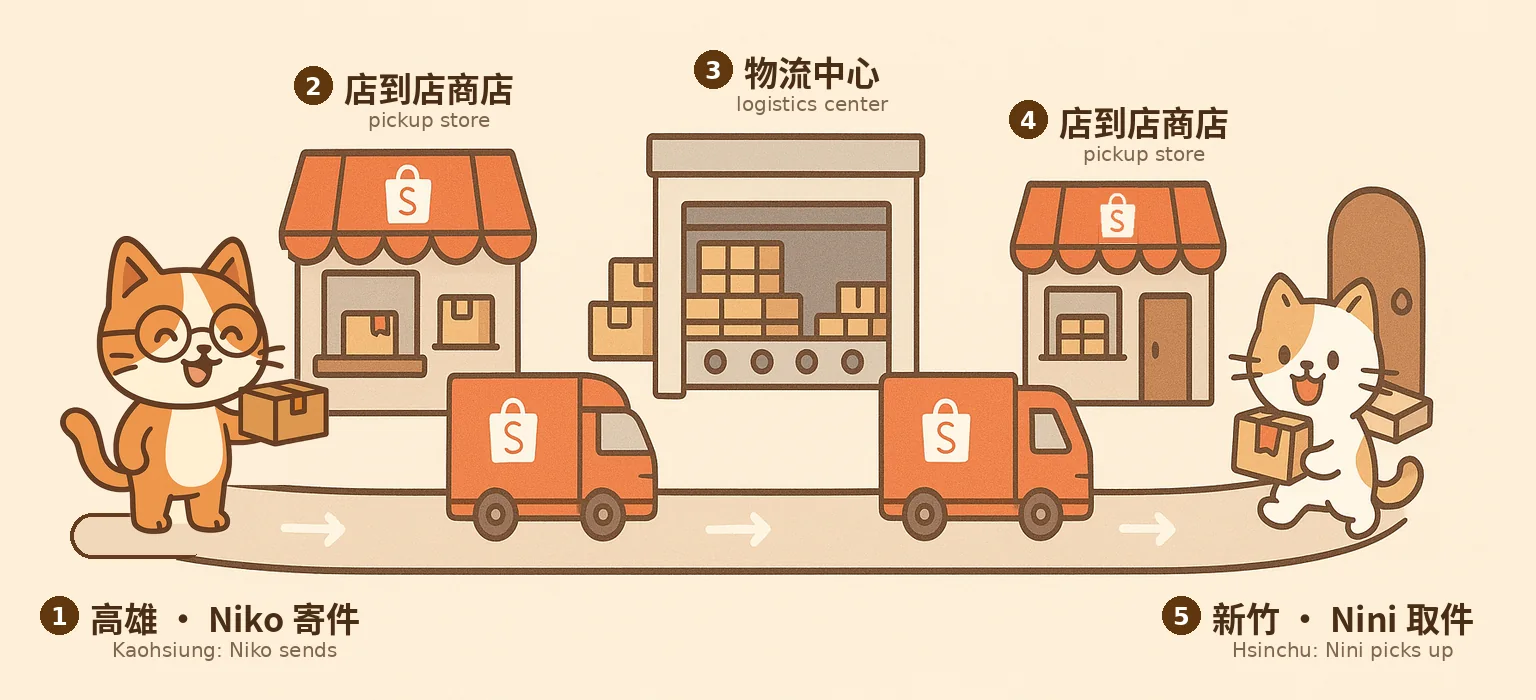
At the pickup store (②): different speeds. Niko can drop the parcel off at any time and leaves ten seconds later. The truck comes only once a day. The store holds the parcel in between, so Niko never waits for the truck, and the truck never waits for Niko.
At the logistics center (③): different sizes. A truck trip costs about the same whether the truck carries 1 or 500 parcels. Thus, the logistics center collects parcels from many stores and sends them north in one full truck. Sending parcels in big batches amortizes the fixed cost of a trip: one trip's cost is shared by many parcels.
Both stops are buffers: places where things wait for a while, so that two sides with different speeds or different sizes can work together.
Buffers appear in many familiar applications. A buffer always sits between two sides that cannot keep pace with each other.
YouTube's grey bar. The light grey part of the progress bar shows the part of the video that has already loaded but that you have not watched yet. Your Wi-Fi speed can change: data may arrive quickly for a moment, then briefly stop because of interference. But the video must play at a steady speed, such as 30 frames per second. So the player loads tens of seconds of video in advance and keeps it ready. Only when the network stays slow for too long and the stored video runs out do you see the spinning circle. This is called buffering.
Double buffering in games. A 60 Hz screen refreshes its picture every 16.7 milliseconds, from top to bottom, even if the game is not ready. If the game drew directly onto the screen, you would see each frame being drawn. To prevent this, the game draws the next frame in a hidden back buffer while the screen displays the completed front buffer. When the new frame is ready, the two buffers simply switch places.
Show flickering screen

A laptop screen filmed in slow motion, from Julia Evans's blog. The dark band moving down is the screen redrawing its picture, line by line. Without a back buffer, the game's half-drawn frame would appear right below that band, sixty times a second.
Part 2Batching amortizes the fixed cost
Computers buffer data for the same reason the logistics center holds parcels. Each transfer to a slower layer has a fixed overhead, regardless of how much data it transfers. A system call requires a mode switch. An SSD request requires a command, time for the device to complete it, and an interrupt. Transferring one byte at a time repeats that overhead for every byte.
Let's measure it. I read a big file (256 MiB) with the loop below, again and again, changing only block_size, from 1 byte to 16 MiB. Each turn of the loop is one read() system call. The file had been read once just before, so its data was already in the page cache. This way I time the read() calls themselves, not the SSD.
// the read loop, simplified
size_t block_size = 4096;                    // the only thing I change: 1 B ... 16 MiB
char *buf = malloc(block_size);
int fd = open("big.bin", O_RDONLY);
for (;;) {
    ssize_t n = read(fd, buf, block_size);   // one system call
    if (n <= 0) break;                       // 0 means end of file
}read() loop above on my machine: its throughput (indigo), and how many read() calls it needs for the whole 256 MiB file (pink). The file was already in the page cache; best of three runs.read() calls for the 256 MiB fileread() call here, from the 1-byte runWith 1-byte blocks, the loop spends almost all its time entering and leaving the kernel. As the block size increases, the fixed cost is shared by more bytes, so the throughput increases. Around 16 KiB the line flattens: now the time goes into actually copying bytes, and a bigger block cannot help. Batching amortizes the fixed cost of each request over many bytes.
The price of batching: latency

Latency and throughput both describe how fast a device is, but improving one can worsen the other.
- Latency is the time for one request: how long until your one 4 KiB page arrives. It affects how responsive an application feels.
- Throughput (or bandwidth) is how much work finishes per second, counting all requests together.
Think of Niko's parcel again. One full truck carries five hundred parcels per trip, so the logistics center moves a huge number of parcels per day: high throughput 👍. But Niko's parcel sits there until the truck is full: high latency 🥲. A driver who takes one parcel straight to Hsinchu would be fast for that one parcel, but would move very few parcels per day. Waiting to fill a batch increases throughput, but it also increases latency.
Part 3The page cache
When a program calls read(), the kernel first looks in the page cache. If the page is there, it is a hit: the kernel copies 4 KiB from its memory into the program's buffer and returns. If not, it is a miss: the kernel sends a request to the SSD, and the program sleeps until the data arrives. I measured both on a 1 GiB file. Before each cold run, I made sure none of the file was in the page cache: the file was cold.
Something is strange here. One cold page took 64 µs. The file has 262,144 pages, so reading it page by page should take 262,144 × 64 µs = 17 seconds, right? But the cold sequential read took only 0.69 s. 🤷🏾 How?
The answer is readahead. When a program reads a file in order, the kernel uses that pattern to fetch the next pages before the program requests them, in bigger and bigger requests and in the background. By the time the program asks for page 5, page 5 is already in memory. The waiting for the SSD now happens while the program is running. To check if my hypothesis is correct, I turned readahead off for the file and read it in order again:
read() calls on my machine (median of three runs).Readahead made the cold read 13 times faster, even though the program did exactly the same thing. But, readahead only works for sequential access. It doesn't work if you read random locations in a file.
"Linux ate my RAM!"
Here is free -h on my machine:
$ free -h
               total        used        free      shared  buff/cache   available
Mem:            31Gi        10Gi       3.2Gi        86Mi        18Gi        20Gi
Only 3.2 GiB are free, yet programs use only 10 GiB. Where did the rest go? Linux uses as much free memory as it can to cache and buffer file data (buff/cache, 18 GiB here), because a cached page can turn the next read into a hit. When a program needs to allocate memory, the kernel simply frees up the cached pages and offers that free memory to the program:
That is why free has an available column (20 GiB here): free memory plus the cache the kernel can drop. It is the number that tells you how much memory programs can still get. Free memory is wasted memory, so Linux turns it into cache to make the whole system faster.
Part 4Who gets evicted?
Data cannot stay in the page cache forever, because the system must keep giving out memory whenever a process allocates more. When memory is full and a new page must come in, the kernel has to evict a page that is already there. Which one? A good choice keeps the pages that will be used again soon. But the kernel cannot see the future.
The best choice is easy to state: evict the page that will be needed furthest in the future. This rule is called MIN (Bélády, 1966), and no other rule has fewer misses. However, the kernel cannot know the future. Remember SJF in Worksheet 6? It had the same problem: the best scheduler needed the burst lengths in advance. So no real system can run MIN. It is useful only for comparison: it shows the fewest misses possible, so you can see how close the real rules get.
Real rules must guess the future from the past. FIFO evicts the page that came in first. It is simple, but it ignores whether a page is still being used. LRU (least recently used) evicts the page that has not been used for the longest time. It relies on a simple observation: a page used recently will probably be used again soon.
However, exact LRU is expensive. Every access would have to update the page's position in a list sorted by time, and memory is accessed billions of times per second. CLOCK gives almost the same result at a much lower cost. Each page has one used bit, which is set to 1 whenever the page is used. To evict a page, a hand moves around the pages like a clock hand. If a page's bit is 1, the page was used recently, so it gets a second chance: its bit is cleared to 0, and the hand moves on. The first page with bit 0 is evicted. Step through it:
Each page shows its used bit. Blue: a hit. Cream: a second chance. Pink: a miss.
Comparing the four rules
The simulator below runs all four rules on the same accesses. Step through them with Next (or the ← → keys). Each card shows the pages that one rule keeps in the cache. The small line under each page is the fact that the rule uses to decide: when the page came in (FIFO), when it was last used (LRU), its used bit (CLOCK), or when it will be needed next (MIN). On a miss, the card says which page was evicted and why. The chart below the cards counts the misses for every cache size at once: click a column to try that size.
Try the two patterns in order:
- A popular page, 3 pages of cache. Page A is used at every other access. Step to t = 7: FIFO evicts A, because A came in early, and at t = 8 it has to read A again. LRU keeps A, because A is always recently used. CLOCK keeps A too: its hand passes A, but A's used bit is 1, so A gets a second chance. Guessing from the past works well when the same pages are used again and again.
- A big file read once, 4 pages of cache. Pages A, B and C are used twice. Then a program reads a file of six pages, S1 to S6, once. Step from t = 8 to t = 10: FIFO, LRU and CLOCK evict A, B and C, because the file's pages are more recent. MIN keeps A, B and C, because it knows that the file's pages are never needed again. So at the end, the three real rules miss A, B and C again. This is called cache pollution: data that is used only once pushes data that is used often out of the cache.
Why one big copy slows down everything
Cache pollution often occurs when you copy a large file. For example, after copying a 50 GB video to a USB drive, your browser and editor may feel laggy. The copy program itself may use only a few megabytes of memory, but the data it reads also occupies the page cache. To make room, the kernel may evict cached pages used by other programs, such as application code or files your editor reads periodically. Those programs may need the evicted pages again soon, while the video pages will likely not be read again. When you return to those programs, accessing an evicted page requires another read from the SSD.
So a program that reads a lot of data once can slow down the other programs. How can this be avoided? There are two ways. First, the kernel can protect the pages that are used more than once, as the next section shows. Second, the copy program can use Direct I/O: it reads and writes the video without going through the page cache, so the pages of the other programs stay in the cache.
How Linux protects hot pages: two lists
In the second pattern, the three real rules failed because they only look at when a page was used, not how often. So Linux does not use plain LRU. It keeps two lists. A page that is read for the first time goes to the inactive list, on probation. Only a page that is used a second time is promoted to the active list. The kernel evicts from the inactive list. So a big file that is read once only pushes out its own pages. A page has to prove itself twice before it is protected. Since Linux 6.1, the kernel can also use a newer design with several generations instead of two lists, called MGLRU. MGLRU was contributed by Google engineers, and it made Chromebooks and Android phones noticeably more stable.
Open walkthrough 1 ▶ 13 steps · use ← → keys · press E for the explanation
Part 5Write-back: when 100% is still in memory
When a program calls write(), Linux copies the bytes into the page cache, marks the pages dirty, and returns at once. A dirty page holds data that is newer than the disk. The disk is written later, and then the page is clean again. This is write-back caching. The opposite, write-through, would wait for the disk on every write. Write-back makes writes fast and lets the kernel batch them.
Write-back can do even better than batching: it can avoid unnecessary disk writes . If a program writes 100 bytes into the same 4 KiB page fifty times, the page cache absorbs all fifty writes, and the SSD writes the page once. This is called write coalescing. But later is vague. When exactly?

A kernel thread, the flusher, performs the writing. On Linux, the flusher has four settings in /proc/sys/vm/:
| Setting | Default | Meaning |
|---|---|---|
dirty_writeback_centisecs |
500 | The flusher wakes up every 5 seconds. |
dirty_expire_centisecs |
3000 | Data that has been dirty for 30 seconds must be written. |
dirty_background_ratio |
10 | When 10 % of memory is dirty, start writing in the background. |
dirty_ratio |
20 | When 20 % is dirty, make the writing programs wait. |
I wrote 256 MiB with dd and watched the Dirty: line of /proc/meminfo, six times:
dd if=/dev/zero of=f bs=1M count=256 returned, I sampled Dirty in /proc/meminfo every 0.1 s. dd returned in less than 0.11 s. Then, for another 5.6 to 10.6 seconds, the 256 MiB existed only in memory. The kernel never waited the full 30 seconds on my machine.
What if a program writes faster than the disk can take it? I wrote 6 GiB as fast as possible, then called fsync(). This system call returns only when all the data written to the file is on the SSD. (Part 6 explains it in more detail.)
write() calls, then one fsync(), on my NVMe SSD.When about 1.7 GiB were dirty, the kernel started writing in the background. The program still wrote faster than the SSD, so the amount of dirty memory kept increasing, to about 2.5 GiB. The last write() returned after 2.0 s, and fsync() needed 0.6 s more for the rest. On a fast SSD the gap is small. On a slow USB drive it is wide.
Why the flusher sends many pages at once
The flusher does not write dirty pages one at a time. It sends the SSD many requests together, because an SSD behaves like a logistics center with many trucks. It has many flash chips that can work at the same time, but only if it gets many requests at once. The number of requests waiting inside the device is the queue depth (QD). This benchmark by Micron sent 4 KiB random writes to one of their SSDs:
Going from 1 to 4 requests at a time almost doubles the throughput. But each request now waits in line behind the others, so its latency more than doubles too. From 8 to 16, throughput hardly increases, but latency doubles again. A deeper queue can increase throughput, but also increases latency.
Optional reading: testing a cloud disk with fio's bs and iodepth
fio is the standard Linux tool for testing storage speed. Two of its options are knobs you have seen: bs is the size of each request, like block_size in Part 2, and iodepth is the queue depth. In From 2K to 160K fio IOPS: How Queue Depth Unlocks GCP Hyperdisk Performance (Eason Cao, 2026), a Google Cloud disk rated for 160,000 requests per second measured far less, because the test did not send enough requests at once. The post also explains a simple rule, Little's Law: to keep a device busy, the number of requests in flight must be about (requests per second) × (latency). At 2 ms per request, one request at a time allows only 500 requests per second. The post links to a Chinese version.
Why "Eject" takes forever
You copy a 4 GB movie to a USB drive. The copy dialog jumps to 43 % in a second, then moves very slowly. When it finally finishes copying data, you click Eject, but Eject hangs for a minute ... Many people have seen this, for example in this Reddit thread:

What happened? The first gigabytes went into the page cache at memory speed. The dialog only measures what write() accepted. Once dirty memory hit the limit, the kernel made the copy wait for the drive. Eject calls sync, which must write out every dirty page that is still left. LWN called this "the pernicious USB-stick stall problem" in 2013: on a machine with lots of memory, gigabytes of dirty data can pile up in front of a slow drive, and the whole system can stall while they drain.
A progress bar measures the speed of write(), not how much data safely reaches the disk.
To prevent data loss, never just pull a USB drive out , you must eject the USB drive first.

Part 6When can my data be lost?
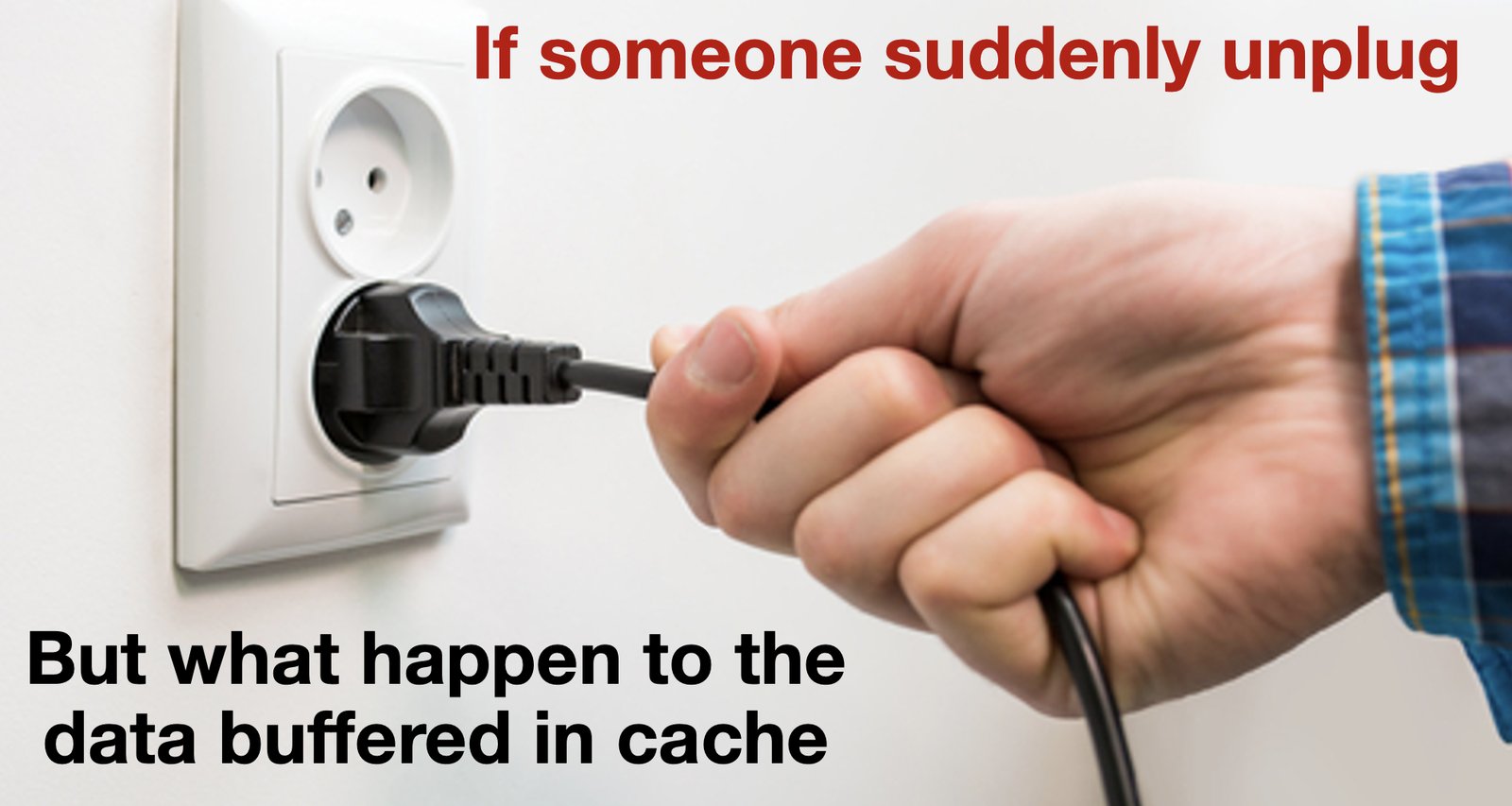
Between write() and the flash chips, your data passes through several layers. Each one is fast because it is volatile: its contents are lost when power fails. Two kinds of accidents can happen:
- The program crashes. Data still in the program's own memory is lost. Data that
write()already handed to the kernel is safe: the kernel keeps running and writes it later. - The power fails. Everything in DRAM is lost: the program's memory, the page cache, and even the cache inside the SSD.
To survive a power failure, a program calls fsync(fd). It writes the file's dirty pages to the device, tells the device to flush its own cache, and returns only when the data safely arrives at the disk. fsync(fd) can be slow. Let's test it. I wrote 1000 blocks of 4 KiB in three ways:
Calling fsync() after every write was 240 times slower than calling it once at the end: about 1.2 ms per fsync(), against 2 µs for a write() into the page cache. O_DIRECT (the Direct I/O of Part 4) skips the page cache, so each write waits for the SSD, but it does not ask the SSD to flush its cache. Ensuring durability takes time, so programs usually synchronize writes at specific points. For example, a database calls fsync() only when a transaction is finished, not after every byte.
How an editor saves a file safely
When you press Save, the editor must replace the old file with the new version. The simple way is to open the file, empty it, and write the new content into it. However, if the power fails in the middle, the file is left half written or even empty: the old version is already gone, and the new version is not complete. This is called a torn write.
Therefore careful editors never overwrite the old file. Instead, they use the atomic rename trick: write the new version into a separate file, then rename it over the old one. For example, when Microsoft Word saves a document, it first writes the new version into a temporary file such as ~wrdxxxx.tmp in the same folder. Then it deletes the old document and renames the temporary file to the document's name (Microsoft KB 211632). If a save is interrupted, you may find such a ~wrd….tmp file left next to your document.
On Linux, a program does the same in four steps. It writes the new version into a separate copy first, waits until the copy is on the SSD, and only then puts the copy in place of the old file:
int fd = open("settings.tmp", O_WRONLY | O_CREAT | O_TRUNC, 0644);
write(fd, buf, n);                           // 1. write the new version to a copy
fsync(fd);                                   // 2. wait until the copy is on flash
close(fd);
rename("settings.tmp", "settings.json");   // 3. swap the names: atomic, old or new, never half
fsync(dir_fd);                               // 4. make the new name durable too
The key step is rename(). It replaces the old name with the new file in one step, so after a power failure you find either the complete old version or the complete new version, never a mix of the two. The last fsync(), on the directory that holds the file, makes the new name itself durable. To save a file safely: write a copy, fsync() it, then rename() it over the old file.
Open walkthrough 2 ▶ 12 steps · use ← → keys · press E for the explanation
Part 7Counting copies
Using the page cache can result in several memory copy operations (memcpy), which can hurt performance. Think about a web server that sends a video file to a visitor with read() and write():
With read() and write(), the CPU copies every byte twice: from the page cache into the program's buffer, and from the buffer into the kernel's socket buffer. In contrast, sendfile(out_fd, in_fd, …) asks the kernel to send a file to a socket directly, so the network card reads straight from the page cache. This avoids both CPU copies: the data is copied 2 times instead of 4, and both remaining copies are done by DMA. This is called zero-copy, because the CPU copies zero bytes. Web servers such as nginx use it for static files.
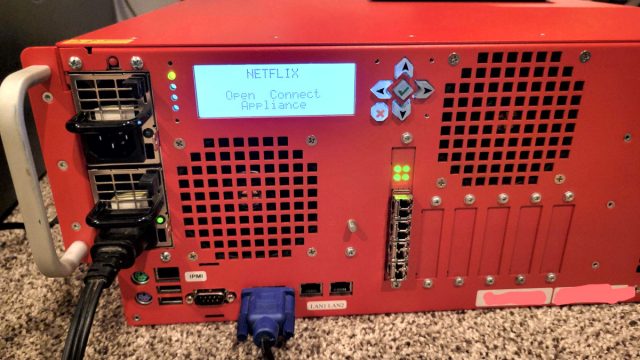
Case study: Netflix. Netflix streams video from its own servers, called Open Connect, which run the FreeBSD OS and the nginx web server with sendfile(). They also encrypt in the kernel (kernel TLS), so the data still never enters user space, and the network card does the encryption. In 2022, one test server reached 731 Gb/s (Drew Gallatin's slides). At this speed, memory bandwidth is the limit.
That means sending about 90 GB of video every second. With the traditional method, using read() to copy data into the program, encrypting it there, and using write() to send it to the socket, every byte moves through memory about eight times. This requires about 730 GB/s of memory bandwidth. With sendfile() and encryption handled by the network card, each byte moves through memory only twice: first when the SSD loads it into the page cache, and again when the network card reads it. This requires only about 180 GB/s. Avoiding unnecessary copies reduces memory traffic.
cat can also avoid copying data through user space. When both its input and its output are regular files, as in cat a > b, it calls copy_file_range(). This system call asks the kernel to copy the data from one file to the other inside the page cache, so the data never passes through a buffer in cat. Some file systems can do even better: the new file simply shares the old file's blocks on the disk, so nothing is copied at all. You can watch it in Part 10. A third way to avoid the copy is mmap(), which maps the page cache straight into a process's address space. You will meet it with virtual memory in Week 10.
Part 8Cache can be a lie
Caches make systems fast on average, but they also make them unpredictable.
The cache inside your SSD
Modern SSDs store 3 or 4 bits in each flash cell (TLC, QLC). That is cheap, but writing such cells is slow. So the drive first writes incoming data in a fast mode with one bit per cell, called the SLC cache, and moves it into the dense cells later. While the SLC cache has room, the drive is very fast. When it is full, writes slow to the sustained rate of the denser cells. Tom's Hardware measured a Samsung 980 PRO 1 TB: about 5.2 GB/s for roughly the first 120 GB written, then about 1.8 GB/s. A new SSD feels amazing in a short benchmark that writes only a few gigabytes, because all of it fits in the SLC cache. That is why such benchmarks can be a marketing trick 🎭. Copying a 200 GB game library tells a different story. As Warren Buffett said: “Only when the tide goes out do you discover who’s been swimming naked.”
Cold or warm?
My cold read of a 1 GiB file took 0.69 s, and the warm one took 0.096 s. Which one is "the" speed of the program? Both, depending on the question. Before you trust a number, ask:
- Was the cache cold or warm? The second run of almost anything is faster.
- Was the SSD empty or full, and was its SLC cache fresh? Short or sustained?
- Did the program wait for
fsync(), or did it measure only the page cache? - How many requests were in flight: queue depth 1 or 32?
Benchmark tools let you choose. hyperfine warns in its documentation that disk caches can heavily influence results. --warmup 3 runs the program three times first, which measures the warm case. To measure the cold case, the page cache must be emptied before each run:
$ hyperfine --warmup 3 'grep -r TODO src/'                                  # warm: the best case
$ hyperfine --prepare 'sync; echo 3 | sudo tee /proc/sys/vm/drop_caches' 'grep -r TODO src/'   # cold: the worst case
Part 9Bufferbloat: buffer is too big
Have you had this experience? You share the Wi-Fi with your roommate. You are on a LINE video call with your mom, and then your roommate starts downloading a big file. Suddenly the video freezes, and your mom's voice feels laggy. Yet a speed test still shows fast internet. So why does the call become so bad?
The Wi-Fi router is between two sides with different speeds. Packets arrive from the internet faster than the router can send them over Wi-Fi. Therefore the router keeps the waiting packets in a buffer. Because the file is sent as fast as possible, this buffer stays full. As a result, each packet of your call waits at the back of a long line:
The download still runs at full speed, but the waiting time increases. With 1 MB in the buffer, a packet that arrives now waits 1 MB ÷ 10 Mb/s = 0.8 s. A buffer that is too big increases latency without increasing throughput. This is the price of batching from Part 2, but here nothing is gained in return: the download is not faster, and the call is much slower. This phenomenon is known as bufferbloat.
The solution to bufferbloat: separate buffers. The router keeps a separate short queue for each connection and sends from the queues in turn. In router settings, this feature is often called SQM (smart queue management). In addition, when the download's packets have waited in its queue too long, the router drops a few of them, and the sender of the download then sends more slowly. As a result, your call's packets wait less. This situation is common: services with different service level objectives share the same platform. Here your call needs low latency, while the download needs high throughput. You saw the same situation in Worksheet 2: Google runs user-facing serving systems and batch processing on the same machines. Similarly, 4G/5G networks put voice calls in a separate class from ordinary internet traffic.
Just for fun. The Waveform bufferbloat test measures your latency while it fills your download and then your upload, and grades the result from A+ to F. Run it on the dormitory Wi-Fi and on your phone's mobile data. Which one has more bufferbloat?
Part 10Practice in the terminal
Play with github.com/sys-nthu/os26-w7. Run ./setup.sh && make.

- How is RAM being used? Run
free -h. How much is free, how much available, and how much is buff/cache? Read a big file (cat big.bin > /dev/null) and runfree -hagain. Which column grew? - Cold vs. warm, with and without readahead.
make big.bincreates a 1 GiB file../01-coldread big.bindrops the file from the page cache, then reads it cold, warm and cold without readahead, like my chart in Part 3. Last, it reads the file at random places. Which ratio surprises you most? - The buffer-size sweep.
./02-sweep big.binruns theread()loop of Part 2 with block sizes from 1 byte to 16 MiB. Then count the system calls of the extremes withstrace -c ./02-sweep big.bin 1 100000(1 byte per call) andstrace -c ./02-sweep big.bin 1048576 104857600(1 MiB per call). Where does your curve flatten? - Watch dirty pages.
./03-dirty.shwrites 256 MiB withdd, prints how longddtook, then prints theDirty:andWriteback:lines of/proc/meminfoevery 0.5 s. How many seconds does the data stay dirty before the kernel writes it? Run it again and typesyncin a second terminal while it counts. What changes? - How long does fsync() take?
./04-fsyncswrites 1000 blocks of 4 KiB three ways. How many microseconds is onefsync()on your machine? (A Codespace runs on a cloud disk. Expect it to be much slower than my NVMe SSD.) - How cat copies.
echo hello > A; strace -e trace=read,write,copy_file_range cat A > B. Thenstrace -e trace=read,write,copy_file_range cat A, writing to the terminal. Which system call doescatuse in each case, and why can it not use the same one?
Self-checkLearning goals
Check each item that you can do without looking at the worksheet. The next quiz covers these topics. (Progress is stored only in this browser.)
AttributionCredits
- The course illustrations of Nini and Niko are NTHU CS Operating Systems course material (Tony Chen / Yun-Chih Chen), licensed under CC BY 4.0. The cat art is from Freepik and ChatGPT.
- The "flush the cache" and "unplug" pictures come from last year's course handout Caching and Buffering. Shopee is a trademark of its owner and appears only as an everyday example.
- The slow-motion GIF of a laptop screen is © Julia Evans, from her blog, and is loaded from her site.
- The copy-dialog screenshot and the "bad boy" comic (a meme edit of a Mr. Lovenstein comic) are loaded from Reddit, and the Open Connect photo from Ars Technica. Each one links to its source.
- All measurements were made on one Linux 6.8 machine (Intel Core i9-13900KF, Micron 2400 NVMe SSD, ext4), and every chart is drawn from the measured data. The queue-depth numbers are from Micron.
- The two-list walkthrough follows the LRU description in LWN and the Multi-Gen LRU documentation, both simplified for teaching. The writeback defaults are from
mm/page-writeback.c. - Case studies: Drew Gallatin's Netflix talk; LWN on the USB-stick stall problem; the Bufferbloat project
- L. A. Bélády, "A study of replacement algorithms for a virtual-storage computer", IBM Systems Journal, 1966.